
Gamification
The Gamification tab in Members, for the owner and admins. How to turn the community's points on and off, how much each action is worth, what happens to points already earned and how it differs from the Global Ranking.
Gamification decides whether taking part in the community earns points and how much each action is worth: posting, commenting, liking, attending an event, completing a lesson. The points feed the Ranking and members' levels.
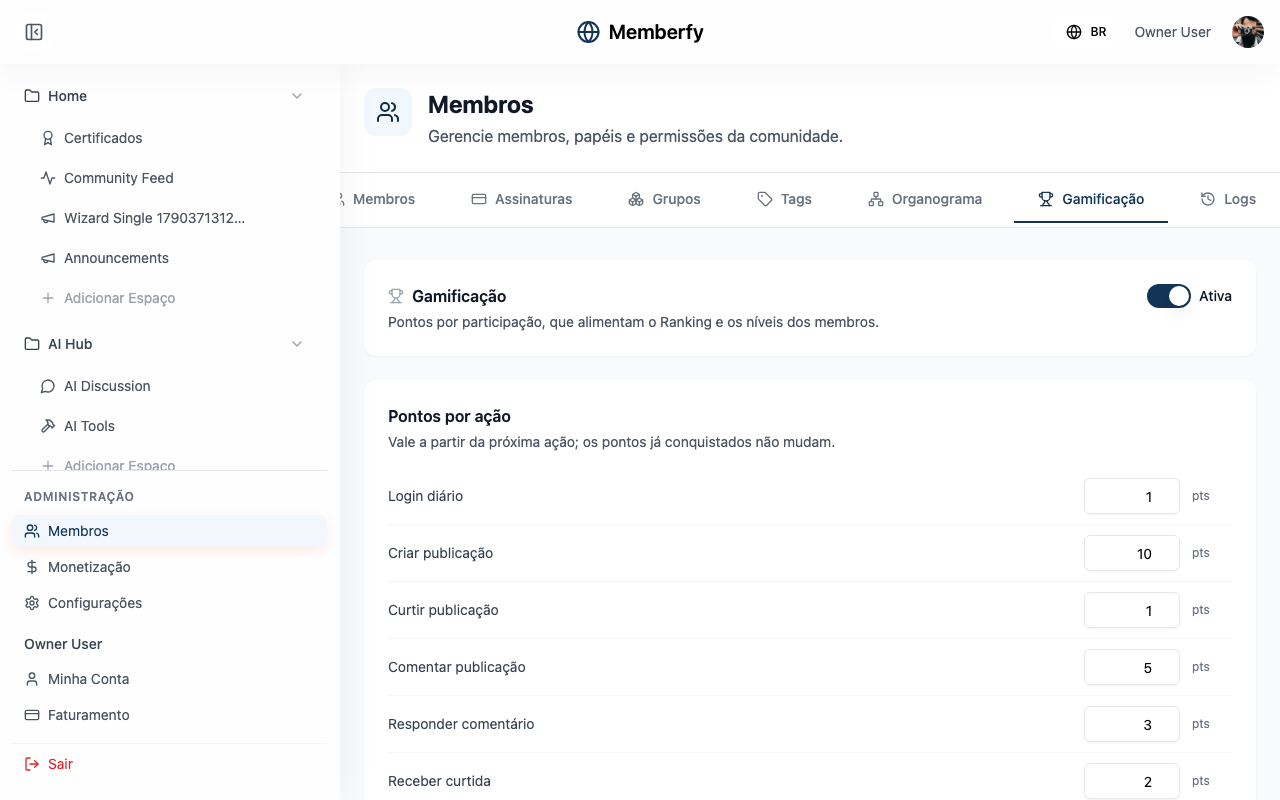
It lives in Members › Gamification: "Points for taking part, which feed the Ranking and members' levels."
What it's for
| Community | How to tune the points |
|---|---|
| Online school | Give Complete lesson more weight than Like post, to reward people who study |
| Customer community | Value Reply to comment, to recognize people who help others |
| Events community | Raise Participate in event, to reward people who show up |
| Community that doesn't want competition | Turn gamification off |
Who can
The owner and admins. Moderators and finance don't see the tab.
How it works
Turning it on and off
The switch at the top of the tab shows On or Off. Gamification is on when the community is created.
While it is off, "no action earns points. Points already earned are kept." When you turn it back on, actions count again from then on; what happened while it was off doesn't count.
Points per action
Each action has its own value, a whole number from 0 up. The default values:
| Action | Points |
|---|---|
| Daily login | 1 |
| Create post | 10 |
| Like post | 1 |
| Comment on post | 5 |
| Reply to comment | 3 |
| Receive like | 2 |
| Create event | 20 |
| Participate in event | 20 |
| Create course | 30 |
| Enroll in course | 10 |
| Complete lesson | 25 |
A change "applies from the next action on; points already earned do not change." An action set to 0 stops earning points, without turning the others off.
Gamification and Global Ranking
They are two different switches:
| Switch | Where | What it does |
|---|---|---|
| Gamification | Members › Gamification | Whether actions earn points |
| Global Ranking | Settings › General | Whether the whole community's ranking shows to members |
With gamification off, the ranking stops changing, because nobody earns new points.
Step by step
Change how much an action is worth
Role: owner or admin.
- Members › Gamification.
- Under Points per action, change the number next to the action (for example, Complete lesson to 40).
- Save. "Saved." appears.
Turn gamification off
- Members › Gamification.
- Click the switch until it shows Off. The points fields are locked.
- Save.
Example
A school that wants to reward studying. Excel School raises Complete lesson from 25 to 40 and lowers Like post from 1 to 0. The following week, a student who completes 5 lessons earns 200 points for them; liking posts no longer counts. The points she already had stay the same.
Common errors and how to fix them
| Message | What to do |
|---|---|
| "Use a whole number from 0 up in …" | The field for that action has a negative, decimal or empty value. Fix it and save again |
| "Could not load gamification." | Click Try again. If it keeps happening, reload the page |
| "Could not save. Try again." | Nothing was saved. Try again in a few seconds |
Frequently asked questions
Does changing the points recalculate the ranking? No. Points already earned stay as they are; the new value applies to the next actions.
Does turning it off erase the points? No. They are kept and show up in the ranking again when you turn it back on.
Can I give someone points by hand? Not yet. Points come only from the actions in the table.
In the API
GET and PUT /api/gamification/config (owner and admin): isEnabled and actionRules, with the points for each action. See Gamification.