
Billing options
The recurring ways to pay for a plan (Monthly, Annual in installments, Weekly, Daily), with price, payment methods, who pays the fee, free trial, cancellation and contract length.
A billing option is a way to pay for a plan: Growth · Monthly at R$ 129, Growth · Annual at R$ 1,188 in up to 12 installments. When someone pays, the option becomes a subscription, which renews on its own every period until it's canceled.
The plan says what the person gets; the billing option says how much and how they pay.
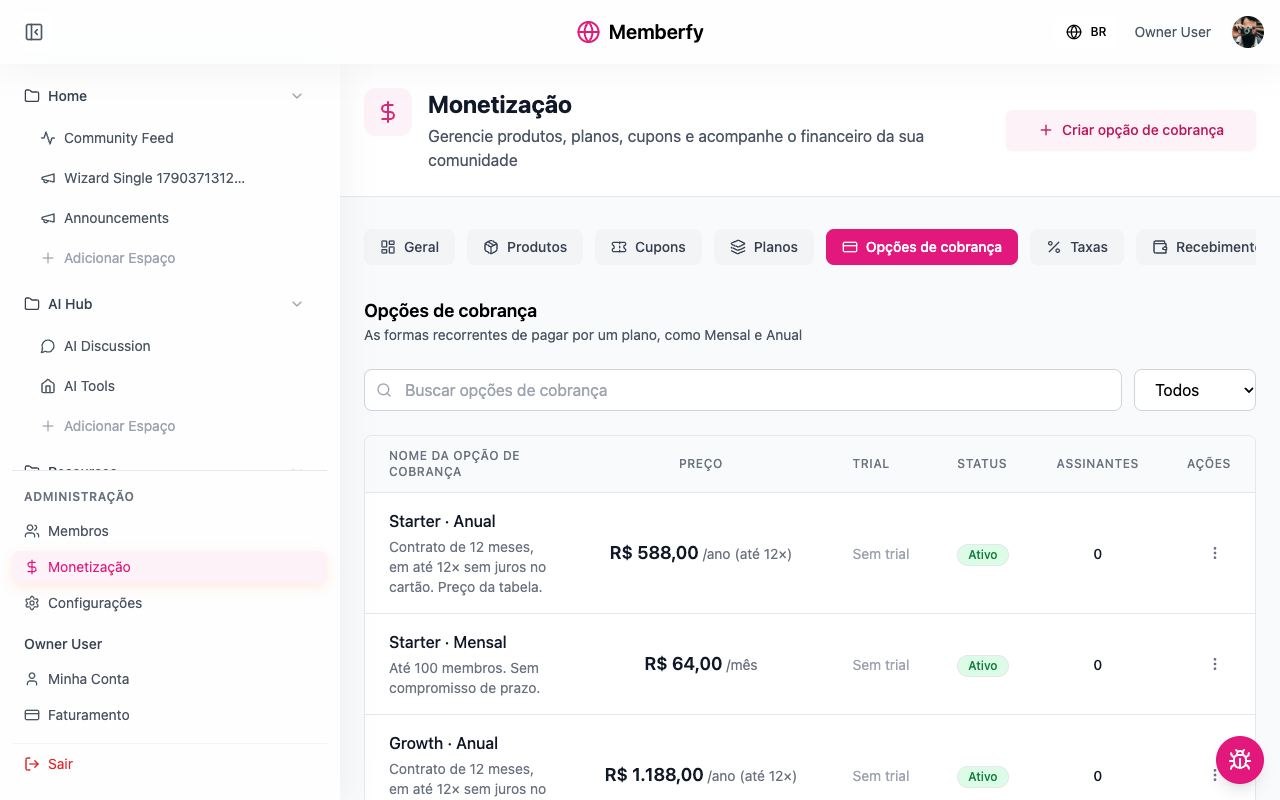
What it's for
| Community | Options of the same plan |
|---|---|
| Online school | Student · Monthly R$ 49 · Student · Annual R$ 470 in up to 12 card installments |
| Coworking space | Resident · Monthly R$ 890 with no contract · Resident · 12 months R$ 790 a month with a 12-month contract |
| SaaS | Growth · Monthly R$ 129 · Growth · Annual R$ 1,188 in up to 12 installments |
Having more than one option on the same plan is what makes the pricing page show the Monthly | Annual toggle and the annual savings.
How it works
Intervals
| Interval | How it charges | Notes |
|---|---|---|
| Monthly | One charge a month | Can have a contract length |
| Annual in installments | The whole year in one purchase, in up to 12 card installments; PIX and boleto paid in full | See Annual in installments |
| Weekly | One charge a week | Doesn't take add-ons |
| Daily | One charge a day | For short passes. Doesn't take add-ons |
The interval can't change after creation ("Cannot be changed after the billing option is created"). To change it, create another option.
To charge every three or six months with a commitment, use Monthly with a 3- or 6-month contract length: billing stays monthly, and the minimum term is guaranteed.
Free trial
Free Trial? gives 1 to 30 days before the first charge. With card enabled, Require Card for Trial? asks for the card upfront: at the end of the trial, the first charge goes to it.
Good to know: during the trial, the person doesn't yet count as a subscriber for Subscribers spaces or for the plans in an access list.
Cancellation
Allow Cancellation (default Yes) lets subscribers cancel on their own. With No, only the staff can cancel, and the subscriber sees "This plan does not allow cancellation. Please contact the community." When a subscriber cancels, access continues until the end of the paid period, with no new charges.
Payment methods and fee
Tick Credit Card, PIX and/or Boleto. On monthly, each month is a new charge with the chosen method; on card, the renewal is automatic on the saved card. See Renewal.
Who Pays the Fees? decides whether the platform fee (6.99% + R$ 2.49 per charge) comes out of the community's amount (Organization) or is added to the price (Buyer). The form opens with Buyer.
Installments and interest
On annual in installments, the year can be split into up to 12 card installments. Installments carry Memberfy's installment interest, a total percentage of the amount:
| Installments | Interest (total on the amount) |
|---|---|
| 1× (single payment), PIX and boleto | None |
| 2× to 6× | 4.29% |
| 7× to 12× | 6.00% |
Who pays the installment interest? decides whether it is added to the installments (Buyer, the default) or comes out of the community's amount (Organization). The platform fee is calculated on the amount without interest and doesn't change with installments. Examples in Annual in installments.
Status
Draft, Active or Inactive. Only Active options appear on the pricing page. Deactivating doesn't cancel existing subscribers.
A new option starts as Draft, and you can create and edit it before the Business Information is approved. Setting it to Active requires approval.
Who can
Owner and admin create and edit. Finance views.
The life cycle of a subscription
Everyone who pays for an option gets a subscription, which goes through these states:
| State | When | Access |
|---|---|---|
| Trial | During the free trial | Doesn't yet count as a subscriber for subscriber spaces |
| Active | Payment up to date | Yes |
| Past Due | The renewal wasn't paid | Until the subscription is brought up to date or ended |
| Paused | The staff paused the subscription | No |
| Canceled | Canceled by the subscriber or by the staff | Until the end of the paid period |
These are the names shown on the Options tab and on the member's Billing page. See Renewal.
Step by step: create a billing option
Role: owner or admin.
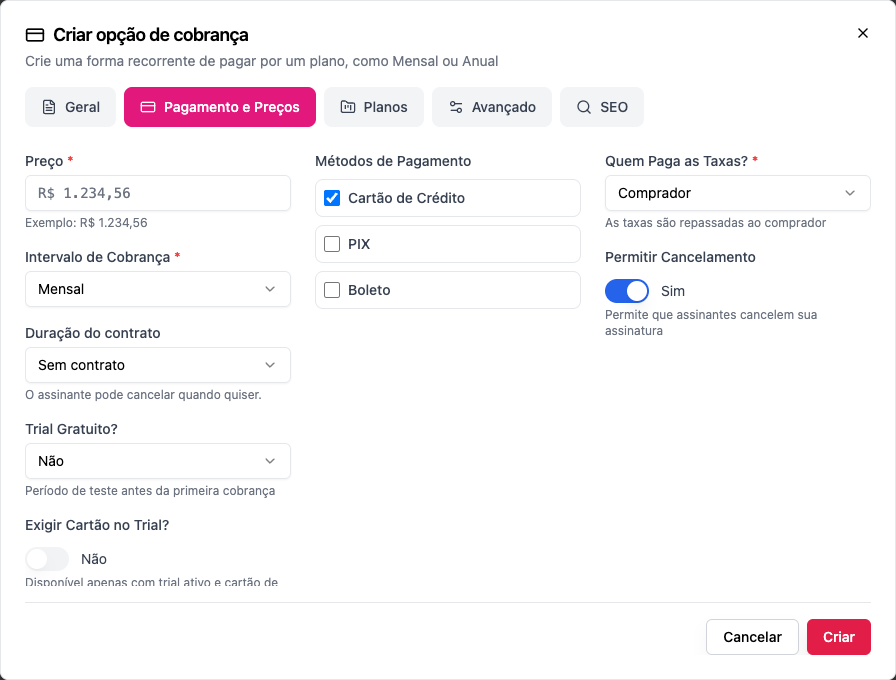
- Open Monetization › Options and click Create billing option.
- General: the Billing option name (e.g. Growth · Monthly; the buyer sees this name), the short and full descriptions, and the images. Put what sets the option apart in the description ("No minimum term", "12-month contract").
- Payment & Pricing:
- Price *: the amount of each charge (on annual in installments, the price of the year).
- Billing Interval *: Monthly, Annual in installments, Weekly or Daily.
- On monthly, Contract length: No contract, 3, 6, 12 months or Other length (1 to 36).
- On annual in installments, Card installments: up to 12×.
- Free Trial? and Require Card for Trial?, if you want a trial.
- Payment Methods.
- Who Pays the Fees?
- Allow Cancellation.
- Plans: choose the plan the option belongs to (or do it later, on the plan itself).
- Advanced and SEO: post-purchase, benefits, and how the option appears in search engines.
- Click Create. With the Business Information approved, choosing Active on creation already publishes the option; without it, the option is saved as a Draft and the form shows the way to the Business Information.
Examples with numbers
The platform fee is 6.99% + R$ 2.49 per charge, the same with any method.
| Option | Charge | Fee | The community keeps |
|---|---|---|---|
| Student · Monthly, R$ 49 | every month | R$ 3.43 + R$ 2.49 = R$ 5.92 | R$ 43.08 a month |
| Growth · Monthly, R$ 129 | every month | R$ 9.02 + R$ 2.49 = R$ 11.51 | R$ 117.49 a month |
| Growth · Annual, R$ 1,188 in 12 installments | once a year | R$ 83.04 + R$ 2.49 = R$ 85.53 | R$ 1,102.47 a year |
| Resident · 12 months, R$ 790 | every month, for at least 12 months | R$ 55.22 + R$ 2.49 = R$ 57.71 | R$ 732.29 a month |
With Who Pays the Fees? = Buyer, Student · Monthly would cost the buyer R$ 49 + R$ 5.92 = R$ 54.92 a month, and the community would receive R$ 49.
Copy the billing option link
Role: owner or admin.
In Monetization › Options, in the option's actions menu:
- Copy link copies
https://<community address>/pricing/<plan>/<option>: the pricing page with the plan and the option already chosen. Use it, for example, to promote annual only. - View Page opens the same address.
The option and its plan must be active: if not, the item is disabled with "Activate the option and the plan to share it".
Changing an option that already has subscribers
- Name, description, images, payment methods: change them freely.
- Price: the new price applies to people who subscribe afterward; existing subscribers stay at their subscription's amount. To make it clear, create a new option and deactivate the old one.
- Interval: doesn't change. Create another option.
- Delete: the screen warns that "All active subscriptions will be canceled". Prefer Inactive.
Common errors and how to fix them
| Message or situation | What to do |
|---|---|
| Select at least one payment method | Tick card, PIX or boleto |
| Invalid billing interval | The interval sent doesn't exist; use Monthly, Annual in installments, Weekly or Daily |
| A contract duration is only available for monthly subscriptions | Remove the contract, or switch to Monthly |
| Contract duration must be a whole number of months between 1 and 36 | Fix the term |
| Require Card for Trial? is disabled | Enable Credit Card and turn the trial on |
| The option doesn't show up to tick on the plan | It's already in another plan, or it's an add-on |
| This product has no payment method enabled. Contact the community. (at checkout) | Tick at least one method |
Frequently asked questions
What's the difference between the option and the plan? The plan is the tier (Growth); the option is the way to pay (Monthly, Annual). A plan has one or more options.
Can I have one monthly option with a contract and another without on the same plan? Yes, and it's a good way to offer a discount to people who commit: Resident · Monthly R$ 890 and Resident · 12 months R$ 790 a month.
Does the free trial apply to everyone? It applies to anyone subscribing to that option for the first time.
Does charging weekly or daily make sense? For short passes (an immersion week, a coworking day). For everything else, monthly or annual.
Where do I see who subscribes to each option? In the Subscribers column of the list, and in the sales on the Dashboard panel.
In the API
A billing option is a product of the subscription type: POST /api/products with type: "SUBSCRIPTION", price, billingInterval (MONTHLY, YEARLY, WEEKLY, DAILY), trialDays, requiresCardForTrial, allowCancellation, commitmentMonths, maxInstallments, allowedPaymentMethods and feePayer. See Products.