
Products
One-time sales of a course, ticket, mentoring session or material. The fields on each tab, price and installments, payment methods, who pays the fee, stock, post-purchase, how to unlock a space with the purchase, and where the product is sold.
A product is something you sell once: a recorded course, a ticket to a meetup, a one-off mentoring session, a PDF, a giveaway. The buyer pays in full or in installments, and the purchase can unlock access to a space in the community.
For charges that repeat (monthly or annual fees), the path is different: billing options inside a plan.
What it's for
| Community | Product | What the purchase unlocks |
|---|---|---|
| Online school | "Excel from scratch" course, R$ 297 in up to 12 installments | The Excel Courses space |
| Coworking space | Day pass, R$ 60 | The Day visitors space |
| Association | Conference ticket, R$ 450, 200 seats | The event space, with the program |
| Mentoring | One-hour 1:1 session, R$ 350 | The session's private space |
How it works
Types
| Type | How it charges | Where you create it |
|---|---|---|
| One-time Product | Once, paid in full or in up to 12 card installments | Monetization › Products |
| Billing option | Again every period | Monetization › Options |
This article covers the one-time product.
Status
| Status | Meaning |
|---|---|
| Draft | Being prepared. Not on sale. It's the status of a new product, and you can create and edit it before the Business Information is approved |
| Active | On sale. Only with the Business Information approved |
| Inactive | Off sale, with nothing deleted. People who already bought keep their access |
Prefer deactivating to deleting a product that has already sold. Deleting takes the product off the list, and the screen warns that it "will be permanently removed, including all product data and settings, sales and transaction history, and buyer records".
Where the product is sold
A one-time product is sold in two ways:
- In a Store: a space that lists products. The store follows visibility like any other space, and only people who can see the store can buy what it shows.
- Through the direct link: with the direct link turned on, the product appears in the community's product catalog, at
/products, and any member can buy it.
A product that isn't in a store the person can see, and has no direct link, is refused at checkout: "This product is not available for purchase here. Look for it in the community store."
Coming soon The Store space and the direct link switch don't appear on screen yet: today they're set through the API (
PUT /api/storefront/spaces/{spaceId}anddirectLinkEnabledon the product). Meanwhile, the/productscatalog shows only products with a direct link, and it's empty in communities that don't use one yet.
Who can
Create, edit, publish and delete products: owner and admin. Finance sees products and sales, without editing.
Step by step: create a product
Role: owner or admin.
- Open Monetization › Products and click Create Product.
General tab
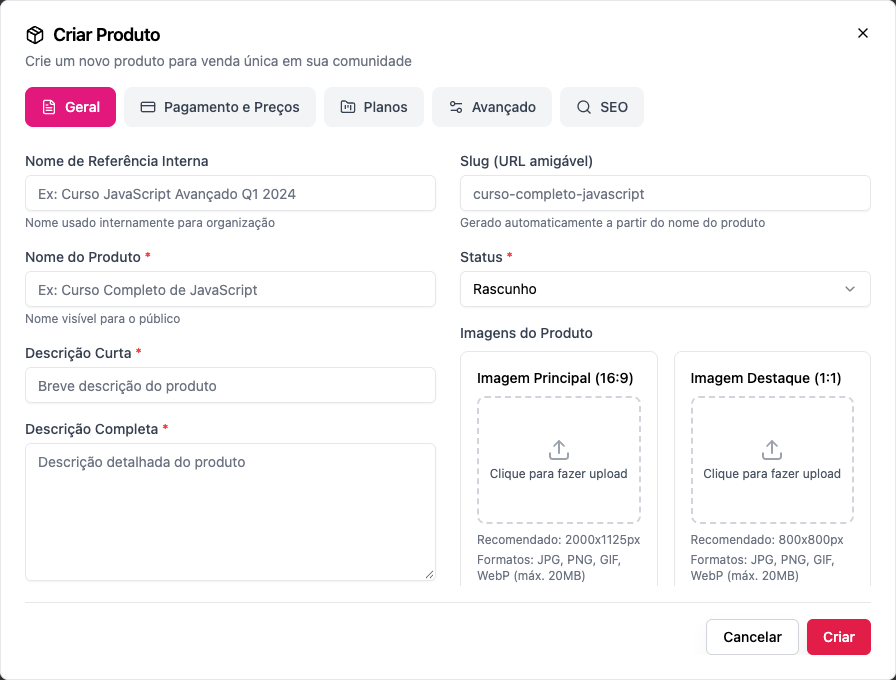
- Internal Reference Name (optional): only the staff sees it. E.g. Excel from scratch — March cohort.
- Product Name *: the name the buyer sees. E.g. Excel from scratch.
- Short Description * and Full Description *: the short one appears on cards; the full one, on the product page.
- Slug (SEO-friendly URL): generated from the name; change it if you want a shorter address.
- Status *: Draft keeps the product in preparation; Active publishes it on creation. Publishing requires approved Business Information: until then, choosing Active saves the product as a draft, with the rest of the form, and you can set everything up.
- Product Images: Main Image (16:9), 2000×1125 px recommended, and Featured Image (1:1), 800×800 px. JPG, PNG, GIF or WebP, up to 20 MB.
Payment & Pricing tab
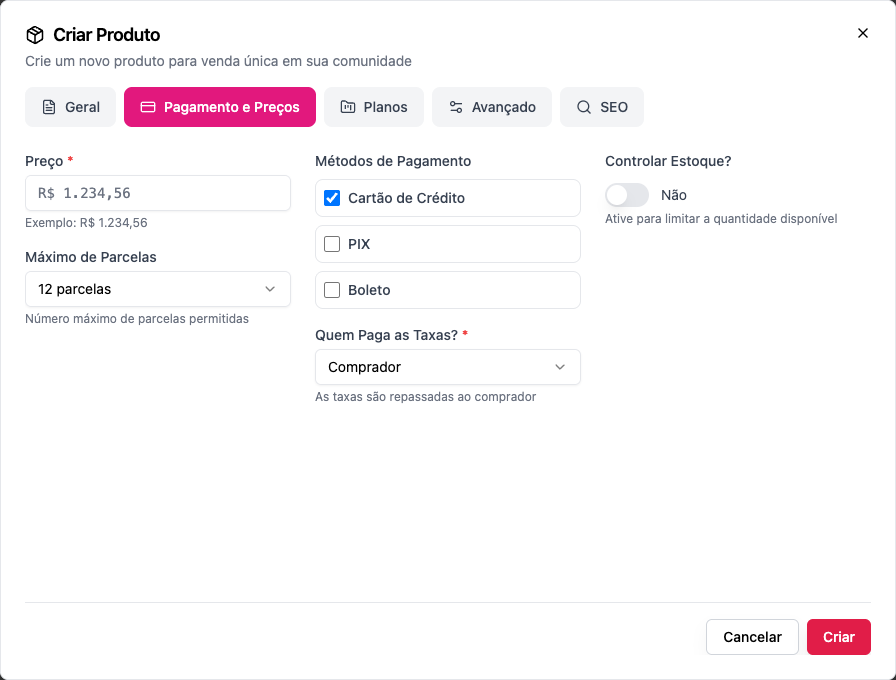
Price *: the product's price.
Maximum Installments: from 1 to 12 (the default is 12). Installments apply to cards only; PIX and boleto are paid in full.
Payment Methods: Credit Card, PIX and Boleto. Tick at least one: "Select at least one payment method".
Who Pays the Fees? *:
- Organization: "The organization absorbs transaction fees". The buyer pays the listed price.
- Buyer: "Fees are passed to the buyer". The fee is added to the price at checkout. The form opens with Buyer selected: check it before saving.
Right below it, Who pays the installment interest?:
- Buyer (the default): "Card installment interest is added to the price: paying in full costs the list price."
- Organization: the interest comes out of what the community receives, and the buyer pays the price split, with nothing added. See Annual in installments.
Control Stock?: Yes to limit seats, and then the Stock Quantity. Once sold out, the product stops selling: "Product is not available for purchase".
Plans tab
- If the product is an add-on to a plan, the tab shows which plans. The list of add-ons lives on the plan itself: in Monetization › Plans, edit the plan and tick the product under Add-ons. See Add-ons.
Advanced tab
- Post-Purchase:
- Redirect URL: where to send the buyer after paying (e.g. the course's welcome page);
- Thank You Message: the text shown when the purchase is complete.
- Organization & Metadata: Display Order (1 = first) and Benefits, one per line.
SEO tab
Title and description for search engines and for the link preview.
Click Create.
Step by step: unlock a space with the purchase
Role: owner or admin.
- Create the course (or event) space with Private visibility.
- Under Who gets in › Products, click Add a product and choose the product.
- Save. Buyers get in; anyone who hasn't bought sees the space with the Requires a purchase lock.
Examples with numbers
The platform fee is 6.99% + R$ 2.49 per sale, with any payment method. See Platform fee.
A R$ 297 course, the community pays the fee (Organization). The buyer pays R$ 297.00 (in full, or in up to 12 card installments). Fee: R$ 20.76 + R$ 2.49 = R$ 23.25. The community keeps R$ 273.75.
The same course, the buyer pays the fee (Buyer). The buyer pays R$ 297.00 + R$ 23.25 = R$ 320.25. The community keeps R$ 297.00.
A R$ 450 ticket with 200 seats, PIX. Each sale leaves R$ 450.00 − R$ 31.46 − R$ 2.49 = R$ 416.05. All 200 seats sold add up to R$ 83,210.00 net.
The R$ 297 course in 10 card installments, with the buyer paying the interest. Interest for 7 to 12 installments: 6.00%, R$ 17.82. The buyer pays R$ 314.82, in 10 installments of about R$ 31.48. The fee is still calculated on R$ 297.00, and the community receives the same R$ 273.75 (fee paid by the organization).
Installments don't change the platform fee.
Common errors and how to fix them
| Message | What to do |
|---|---|
| Product title is required / Product price is required | Fill in the name and the price |
| Select at least one payment method | Tick card, PIX or boleto |
| Product must be active to accept purchases | Change the status to Active |
| Product is not available for purchase | Stock has run out; increase the quantity or turn stock control off |
| This product is not available for purchase here. Look for it in the community store. | Put the product in a store the buyer can see, or turn on the direct link |
| To publish and start selling, the community needs approved business information… (when saving as Active) | The form shows The product is still a draft and "Your other changes were saved." Click Open Business Information, submit it for review and publish after it's approved |
| This product is priced in …, but the approved business information uses … | The draft was created in another currency. Adjust the currency and the price, then publish |
| Community must have approved business information to enable paid products (at checkout) | The Business Information isn't approved, or it was edited and went back to review. See Business information |
| You already purchased this product | The person already has the product; there's nothing to buy again |
Frequently asked questions
Can I create the product before the Business Information is approved? Yes. It starts as a draft, in the currency of the Business Information's country (or in reais, if there's no Business Information yet), and you can edit it as much as you like. Only publishing and selling wait for approval.
Can I sell the same course forever, with no monthly fee? Yes: that's exactly what a one-time product is. The purchase unlocks the course space and doesn't expire.
Can buyers pay in installments? Yes, in up to 12 card installments, up to the maximum you set. The platform fee is the same as for a single payment. Installments carry Memberfy's installment interest (4.29% in total for 2 to 6 installments, 6.00% for 7 to 12), paid by the buyer by default. For the community to absorb the interest, choose Organization in Who pays the installment interest?. See Annual in installments.
Can I discount a product? Yes, with a coupon that includes the product under Applicable Products.
Does changing the price affect people who already bought? No. The new price applies to future sales.
How do I see who bought? In the Buyers column of the product list, and in the statement under Monetization › Dashboard.
In the API
POST /api/products with type: "ONE_TIME", title, price, maxInstallments, allowedPaymentMethods, feePayer (ORGANIZATION or BUYER), hasStock, stockQuantity, directLinkEnabled; POST .../products/{id}/publish and unpublish. Creating doesn't require approved Business Information; publishing (or PUT with status: ACTIVE) without it returns 403, and with a currency different from the approved country's, 400 (param: currency). See Products.